
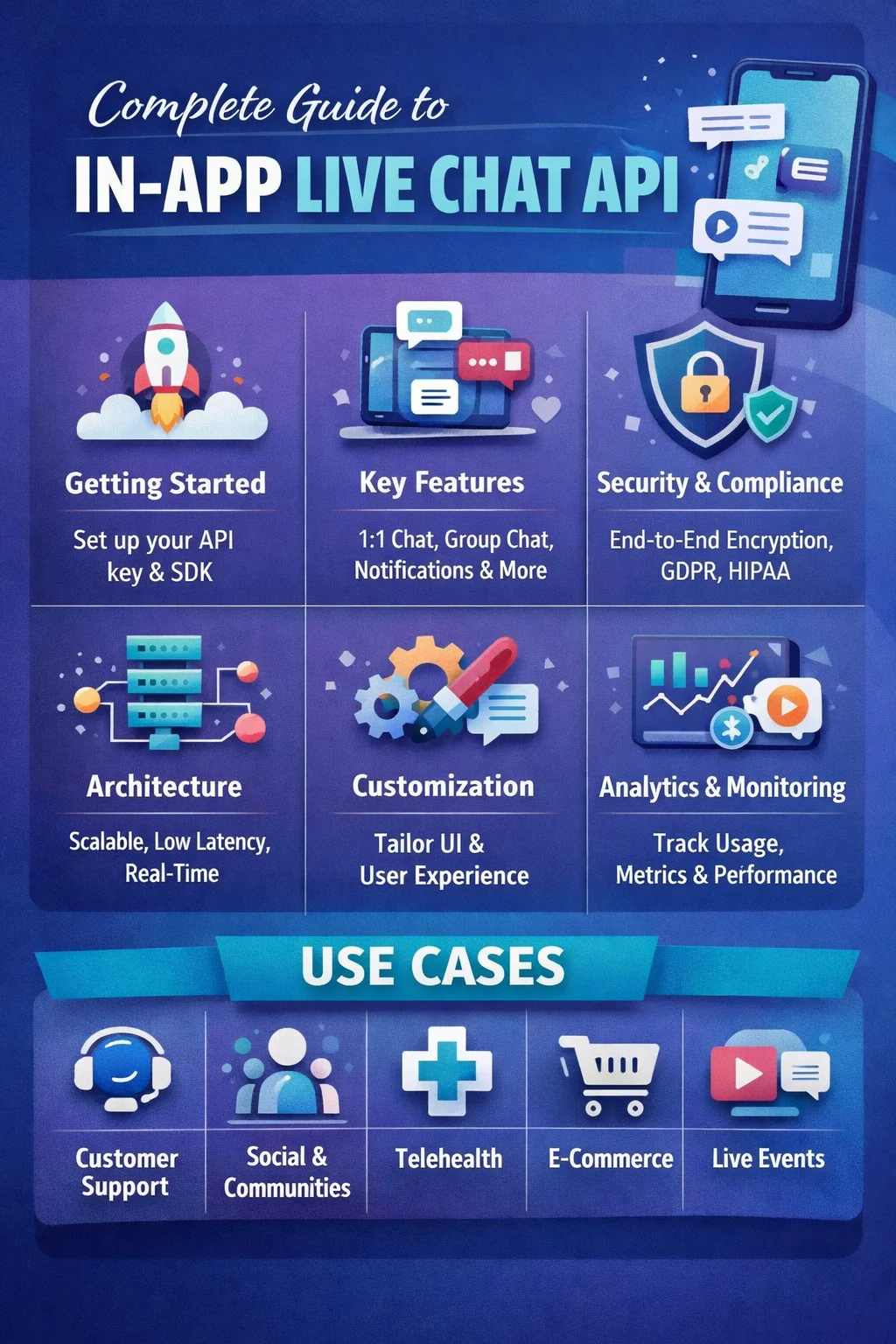
A chat API (also known as an application programming interface) provides developers with tools for building applications and websites that can send real-time messages to users. Rather than developing messaging service from scratch, you can connect to other chat service providers using their cloud-based service that has a scalable infrastructure to enable real-time communication. By using a chat SDK (software developing kit), these APIs can be implemented instantly, without any coding.
Since traditional messaging APIs (those that send messages using SMS or MMS) do not provide instantaneous two-way communication, chat APIs use sophisticated standards (HTTPS, XMPP, or MQTT) to transfer information to recipients in real time. In most cases, chat API messages are structured using a format like JSON so that they can easily be utilized across platforms. However, there are also chat APIs that use Protocol Buffers (`protobufs’) because they provide better performance than storing data using traditional methods.
Whereas messaging API messages generally have a delayed response or allow only for one-way communication, Chat APIs are designed to allow users to interact with each other in real-time. Real-time user interaction is made possible with features such as typing indicators, read receipts, and online presence information. Some systems allow users to manage both messaging applications (SMS) and chat applications within one interface.
In most instances, chat APIs form part of a larger real-time comms ecosystem. As such, this gives developers an opportunity to build upon their initial app by adding other elements (like push notifications, voice/video calling, or AI chatbots) outside of messaging only.
Given their versatility, chat APIs can be used across various application types (i.e. mobile apps/web applications) to provide fast and interactive methods for businesses to communicate with customers.
Types of Chat APIs
There are many different types of Chat API’s available, each designed to fulfill a specific purpose and corresponding use-case.
Video Chat API
The video chat API allows users to use videoconferencing equipment (i.e.- camcorders, microphones, computer screens) to communicate face-to-face over the internet. It also provides an easy way for users to see/hear each other continuously (live) through video/audio chat, allowing for meetings and telehealth, and in the case of educational video conferences and live events. Many chat platforms include the ability to send signals for creating/ending voice and video calls and/or live-streaming to large groups of people. Also, chat platforms may allow for recording chat log activity during meetings/video calls so they can be accessed later for reference purposes or analysis.
Chatbot API
Chatbot APIs are designed for developers to connect automated conversational agents with users through an application, such as a chat app or a website. Automated conversational agents (also referred to as “bots”) can interact with users through text or voice, and an automated conversational agent can perform many of the same functions as a human. Some examples include answering questions, processing orders, and offering customer support. In addition to bots being used by e-commerce, transportation, and service platforms, there are many other industries in which bots assist businesses by providing quick responses to inquiries without requiring a human agent.
Chat API for Websites
Website chat APIs provide developers with the tools they need to add live chat functionality to their website. Businesses utilize website chat APIs to provide real-time communication with visitors, including guiding prospective customers through a purchase, answering questions, and providing technical support to customers. Organizations can also build collaboration tools with website chat APIs that help teams communicate with each other. In addition to live chat, another growing use of website chat APIs is for engaging with an audience during the live streaming of events (such as online conferences or eSports).
Chat Application API
With a modern chat application, users should have access to fluid and spontaneous conversations, meaning people expect immediate answers at all times, they are looking for user friendly interactions between each other, and reliable/smooth overall app experience. The Chat API provides this kind of functionality by enabling developers to quickly implement pre-existing “in app” capabilities instead of having to develop an entirely new messaging system.
Typically, chat APIs are delivered through navigable platforms provided by external vendors in the form of a Platform as a Service (PaaS) model. Once an option is presented in API documentation, a developer will have two main approaches when using chat APIs to build their application: (1) follow API documentation or (2) Develop using the Chat SDK (Software Development Kits) provided by vendor to simplify the implementation of chat functionality independent of which platform the application is built upon.
Chat APIs That Are HIPAA Compliant
In sectors like the healthcare industry, it is essentially required that communication about patient information is private and secure. For this reason, chat APIs have been developed so that they meet all the necessary standards that surround patient privacy with the goal of ensuring protection of sensitive patient information while meeting all strict regulatory compliance guidelines.
In order to achieve this goal using a chat API, HIPAA compliant chat APIs include multiple advanced security protocols such as end-to-end encryption, provider to provider storage of data in a secure manner, and strict access controls to ensure that no one has the ability to gain access to or receive PHI (Protected Health Information) without authorization. Furthermore, considering features such as user authentication, creation of audit logs, use of encrypted communication channels will allow for all parties involved with the communication process to meet any transparency/accountability obligations.
When these measures have been established, healthcare professionals and patients will be able to talk to each other in an immediate fashion, transmit various pieces of data securely, and get alerts that are in accordance with privacy regulations.
Selecting a Good Chat API Service
A strong chat API offers more than simply a way to send messages; it’s an important aspect of user engagement as well as overall the performance of your application regardless of whether it’s for health care, gaming, e-commerce or social media the chat system you put in place must be reliable, scalable and secure.
Key Features of a Modern Messaging API
In order to provide your users with the best possible messaging experience, a chat API needs to have these four main features:
One-on-One Messaging
The ability for two individuals to communicate in a secure manner over a low-latency connection is essential for messaging. Additional features like typing indicators, read receipts and optional end-to-end encryption add security and ease-of-use for both parties.
Group Messaging
Being able to create a group messaging capability will allow multiple users to share a common thread of conversation while still communicating through their respective individual threads. Features that are important for managing a group of users in terms of managing users, assigning roles/privileges to users, moderating content and securely sharing media files through a group messaging system should be available from any chat API provider.
Monitoring Presence and Activity
Presence and activity tracking provides an indication of users’ presence status (e.g. available, away, offline), which makes it easier for users to see when other users are present. The implementations of presence and activity tracking typically utilize publish/subscribe patterns to reduce bandwidth.
Push Notification Message Delivery
Push notification services allow users to receive notifications about their buddies even when they are not online. Push notifications are designed for high engagement and retention through thoughtful handling (e.g. send notification in batches, provide deep link to content).
Use of Messaging as a Service (MaaS) – Chat History and Message Storing
A reliable data storage solution with message history provides a great experience for the user accessing the chat history. There should be features (e.g. search discussions, archive messages, configurable message retention policy, pagination) to allow the user to find old messages easily.
Architecture and Performance Issues
A chat API must be able to meet the unique technical requirements of a chat API when the service is operating at scale to provide fast and reliable service to its users.
Reliability and Availability
A properly architected MAAS implementation provides a scalable, multi-region/multi-server architecture to ensure the MAAS service is always available. The MAAS system will include failover support and message recovery process.
Scalability for High Volume of Users
The API will need to be able to support millions of users using the chat system at the same time. This means that the chat system will need to have methods for distributing messages across many clients efficiently as well as the ability to use horizontal scaling techniques to handle increases in demand.
Rapid Delivery of Messages
Low latency is essential in chat applications to support real-time communication. Some optimization techniques for speeding up the delivery of messages across a global network include utilizing edge servers, reusing connections, and implementing adaptive strategies for retrying to deliver messages.
Compliance and Security
All layers of a chat application should be secured using various means; including but not limited to, using encrypted tunnels to transmit data (TLS), supporting optional end-to-end encryption (E2EE), enforcing access control policies, and implementing logging & monitoring for activity performed with users. When building applications that deal with users’ personal information, compliance to particular standards such as GDPR, HIPAA, or SOC 2, is critical.
Extensibility and Integration
Modern API-based chat applications should support developers extending their functionality via webhooks and event-based systems. Developers can use these types of systems to create unique workflows such as moderation, analytics, and customer relationship management (CRM) by using real-time events, such as when a message has been delivered or when a user has performed some action in the chat application.
Support for Different Platforms
In order to cover many users, chat APIs should be available on multiple platforms. For example, SDKs can be created for mobile (iOS, Android), web apps, and for back-end solutions such as Node.js or Python. Ensuring the same capabilities across all of these platforms will create a single user experience.
Measurement and Monitoring Tools
A well constructed chat system must include tools for monitoring the performance of the chat system and for diagnosing problems that occur on the system after it has gone into production. Using metrics, such as latency, error rates, and message throughput, will help engineering teams understand how to maintain the health of the chat system over time. By integrating with monitoring solutions (e.g., Grafana, Datadog), chat engineering teams will be able to continue to improve the reliability of the chat service and resolve problems quickly.
PubNub’s live chat APIs have adaptable and solid structure
PubNub’s live chat APIs have strong and flexible architecture to support finding solutions to all your needs as an individual.
Public & private chat APIs can be used to build scalable chat solutions to support millions of users.
PubNub has developed a distributed system with intelligent methods to manage high volumes of message traffic.
The PubNub chat API can easily scale horizontally by spreading traffic loads across multiple servers/containers vs. vertical scaling through only one server unit.
Using horizontal scaling allows for seamless growth of your chat solution without introducing any performance bottlenecks as user demand increases.
Chat APIs typically use asynchronous processing for handling all messages that travel through an event-driven pipeline or message queue. Asynchronous processing allows for operations being processed by multiple servers/containers in parallel thus not degrading the overall performance of the system.
PubNub uses standard methods for sharding (splitting the data across multiple databases) and replication (making copies of the data to provide a reliable system) in conjunction with PubNub’s chat API to provide consistent performance to the end users even at peak times or high traffic events.
Who Uses the PubNub Chat API?
PubNub provides developers with the ability to quickly and affordably implement custom chat functionality. Instead of having to create a messaging infrastructure from scratch, teams can spend their time creating user experiences for their product.
Since the platform easily integrates with other applications, as well as having built-in deep customization options, it allows you to increase the speed of development while providing you with flexibility and scalability capabilities.
Typical Uses of Chat APIs
Chat API’s provide real-time communication capabilities across a variety of industries and use cases:
Virtual Events
Using chat at virtual events permits people to interact with each other in real-time. The ability to react to messages, share opinions and engage with one another (via emoji’s) provides users with a more dynamic and immersive experience.
Telehealth
Secure and private messaging between providers & patients improves the quality of virtual health care. Chat can be used for scheduling appointments, providing consultations, and securely transferring private medical data.
Gaming
In-game chat functionality allows players to communicate, devise strategies and create relationships with other players while playing the games. The addition of real-time scores and leaderboards create a more interactive, competitive gaming experience.
Customer support.
Real-time communication between the customer support agent and the customer enables quicker resolution of customer’s issue, thus increasing efficiency of the service; also improves customer satisfaction via prompt service.
Online marketplaces.
The ability to communicate directly between buyer and seller, builds trust, and improves their relationship. It also allows for immediate updates on pricing, product availability, and individualized offers for the customer.
Workplace.
Team chat communication tools allow employees to communicate in real-time, and collaborate within common digital workspaces. This improves productivity via real-time coordination and quicker decision making.
Social communities.
The live chat function creates life to an online community through a real moment access to how and when things happen. Users are able to connect with each other, share their experiences, and celebrate together at events like a live concert, a virtual fitness class, or a major sports game.
PubNub Chat API Site: What You Can Do There
If you’re integrate chat APIs into your app but aren’t sure how to start, then the right resources can be essential in enabling you to create functional and working chat applications very efficiently. PubNub has an extensive repository of documentation and learning tools designed to make building out your scalable and real-time chat applications easy for your business. Their documentation is structured to help guide you through best practices; provide answers to frequent questions; and assist you’re in implementing features that meet both your users’ and business’ needs.
PubNub has three types of resources for you to take advantage of as you navigate the documentation site:
Documentation (Docs)
This is where you can find all of the detailed technical documentation related to the APIs and SDKs, as well as what you need to do to be able to implement your app, so if you want to know what you need to consider when creating a chat app, the docs would be a great place to begin.
In-App Chat Guides
If you want to create engaging chat experiences in your application, whether your application is a small community or large platform, the in-app chat guides are a great resource.
Platform Overview
The Platform Overview is a reference to the platform’s core features, such as real-time presence tracking, serverless functions, and access control systems, which allow you to create secure and interactive applications.
Developer Resources
In the Developer Resources section, you can find product-tours, hands-on tutorials, and interactive demos that give you a good understanding of how to efficiently use the platform.
Blog Posts and Updates
Stay current on all new features released, developments in the industry, and expert advice for designing and creating modern applications.
Step By Step Tutorials (How-To)
Have a collection of easy to understand tutorials showing how to do complex things so that you can successfully build and architect an application.
Live Demonstrations
Live examples of chat applications showing how they function in a real-world scenario. These live demonstrations will inspire you with a new perspective on what you can create.
Integration
Find out how to integrate your application with the leading 3rd party applications so that you can extend the functionality and enrich your overall product ecosystem.
Comprehensive Guides
Comprehensive guide to all aspects of real-time application development from setting up your application, to building from scratch, through advanced scaling strategies.
Developer Teams
Learn from structured Development paths that guide you through building a specific solution such as chat applications, virtual events, IoT system, etc.
Getting Started with PubNub Chat API
Over the past several years, chat has taken on a critical role in how people communicate with each other each day – both for work and for social purposes. When you add a chat API into your application, it gives you the ability to provide your users with real-time conversation capabilities that feel natural, engaging, and responsive without having to do extensive development work on your own.
PubNub is built to handle much of this heavy lifting, such as scalability and reliability, so you can focus on developing great user experiences and generating value in your application.
If you are interested in adding real-time messaging to your application, you can create yourself a free account now and begin to investigate the available APIs. With the PubNub platform, you will have access to the tools necessary to quickly develop and deploy chat capabilities to your users.
If you are still exploring your options, you can try out an interactive chat demo based on the PubNub Chat SDK to see how everything works in action before you take the plunge.



It’s fascinating how chat APIs are evolving to offer real-time communication with features like typing indicators and read receipts. As these tools become more accessible via SDKs, I can see how they’ll transform user interaction in apps.
Thanks for breaking down how chat APIs differ from traditional messaging APIs—especially the part about real-time features like read receipts and typing indicators really highlights their value for user engagement. It’s interesting to see how these APIs are evolving within larger communication ecosystems, too. This kind of clarity helps developers understand the practical benefits of integrating chat APIs into their apps.